Docs
Events
Events
Webinars, workshops, and live sessions.
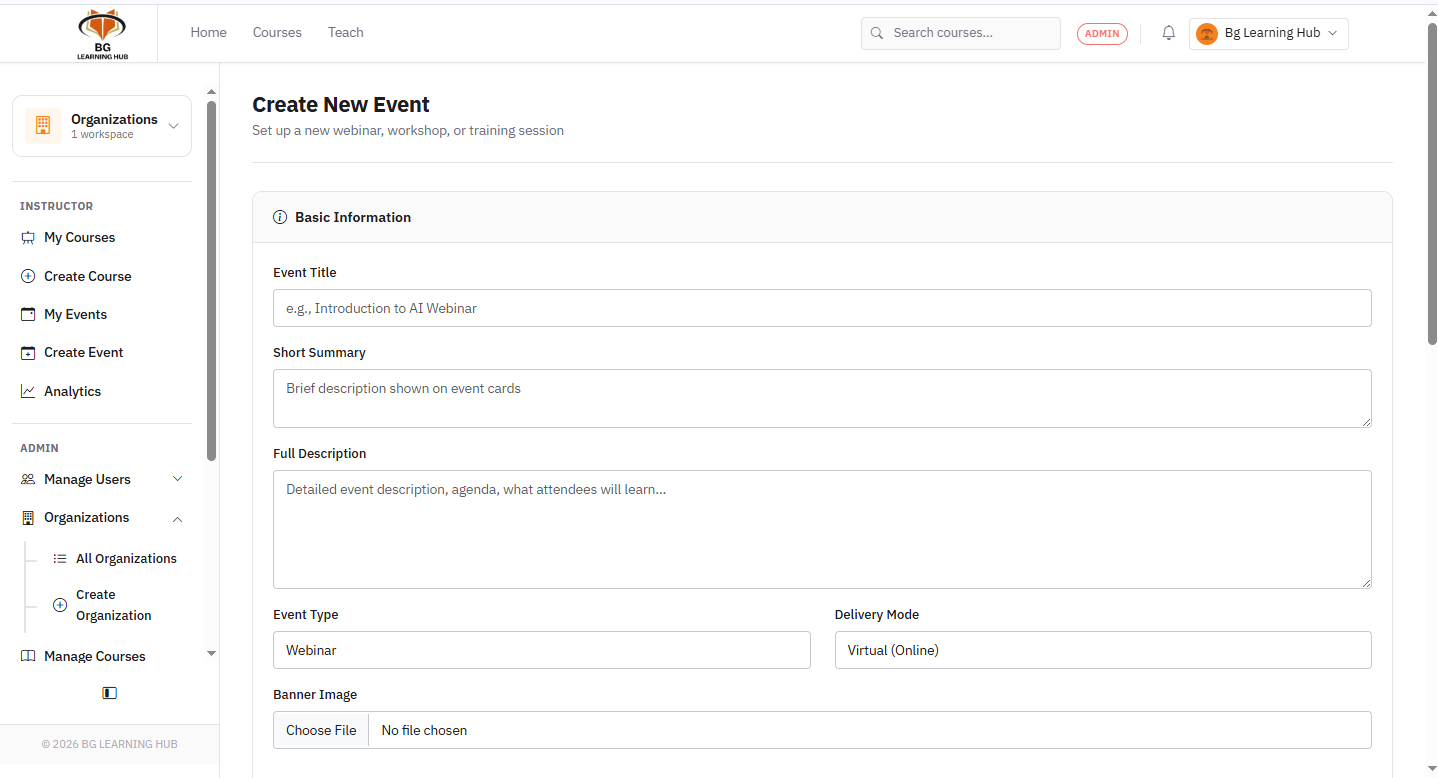
Events are standalone live sessions — webinars, workshops, conferences, seminars, or training sessions — separate from courses.
Create an event
1Go to Events → Create event.
2Set title, type (Webinar / Workshop / Conference…), and delivery mode.
3Pick Virtual → add a meeting link (Zoom, Teams, Google Meet).
Pick Physical → add venue name and address.
Pick Hybrid → add both.
Pick Physical → add venue name and address.
Pick Hybrid → add both.
4Set start/end date-time, timezone, and audience.
5Optionally set a capacity limit and ticket price.
6Publish → the event appears in the Events catalog.
Audience options
–Public — anyone can register.
–Students only / Instructors only / Organizations only — filtered by role.
–Invited only — only users you explicitly invite can register.
Registration & attendance
1Learner clicks Register on the event page.
2If Requires approval is on, status stays Pending until you confirm.
3Organizer marks attendees as Attended or No Show after the event.
After the event
1Paste the recording URL into the event → attendees can watch it later.
2Set status to Completed to archive it from the upcoming list.